
HEIC to PDF Converter
Turn iPhone HEIC photos into a PDF, one photo per page, without uploading them.
Works in your browser. Your photos are never uploaded.
or drop them anywhere in this box
Photos from an iPhone or iPad, as many as you like. JPG and PNG work too. They never leave your device.
HEIC to PDF Converter at a glance
- Price
- Free
- Files uploaded
- None, it runs in your browser
- Converts
- HEIC and HEIF (plus JPG and PNG) to PDF
- Output
- One PDF, or a PDF for each photo
- Page sizes
- Same as photo, US Letter, A4
- Watermark
- None
How to use HEIC to PDF Converter
- Choose your HEIC photosPress Choose HEIC photos or drop them into the box, and add more with Add more photos.
- Arrange and set upDrag the photos into order, turn any that are sideways, and choose One PDF or A PDF for each photo, plus the page size, margin and quality.
- Convert and savePress Convert to PDF to save the PDF, or a ZIP file when you chose a PDF for each photo.
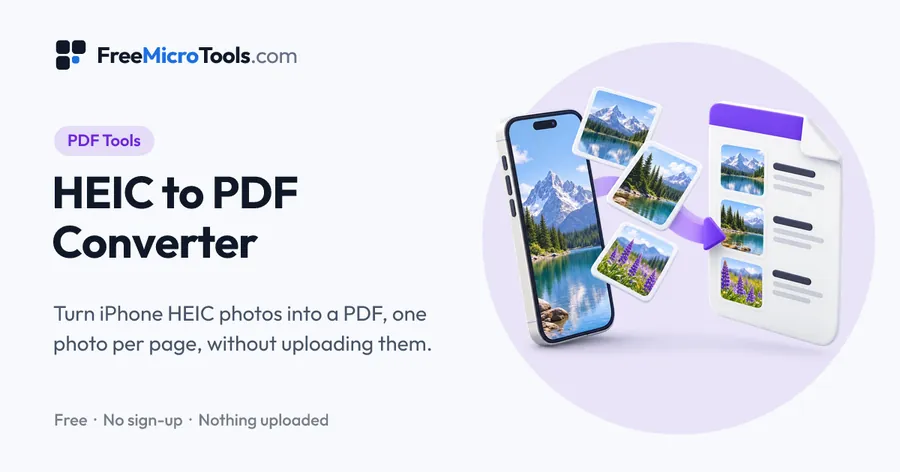
iPhones and iPads save photos as HEIC, which many forms, printers and computers will not accept. Add your HEIC photos here, put them in order, turn any that are sideways, and save them as one PDF with a page for each photo, or as a separate PDF for each one. Choose pages the same shape as the photos, US Letter or A4, with or without margins. Everything happens in your browser, so your photos are never uploaded, and the PDF leaves out the location data the original photos carry.
How it works
HEIC to PDF Converter is a web page that does its work on your own device. The file you choose is opened by your browser, changed there and saved from there; it is never sent to a server, so there is no copy of it anywhere to delete, no queue and no waiting for an upload. Most online tools of this kind send your file to their servers and work on it there, and many keep it for a while. This one does not. There is no account, no watermark and no limit on how often you use it, and the result downloads the moment it is ready.
Send iPhone photos as a PDF or as JPG?
| Send as | Best when | Tool |
|---|---|---|
| One PDF | A form, landlord, school or employer wants several photos or pages as a single document, such as receipts, IDs or signed forms | This converter, One PDF |
| A PDF for each photo | Each photo has to be uploaded or filed separately, but only PDF is accepted | This converter, A PDF for each photo |
| JPG | The website asks for an image, or you want to share, edit or print the photo itself | HEIC to JPG Converter |
Photos of documents
When the photos are of paper documents, choose US Letter or A4 so the PDF prints at a normal page size, and add a small margin if the edges of the paper are close to the edge of the photo. If a portal limits the file to a size in KB or MB, convert here first and then shrink the PDF with Compress PDF, which lowers picture quality only as far as it needs to.
What it does
- Converts HEIC and HEIF photos from iPhone and iPad into PDF, in any modern browser
- Combine many photos into one PDF, or save a PDF for each photo in a ZIP
- Drag photos into order, or use the arrows on a phone
- Rotate any photo before converting
- Page size: same as the photo, US Letter or A4, portrait or landscape, with optional margins
- High quality, or a smaller file for email and upload limits
- JPG and PNG photos can be mixed in with HEIC ones
- Leaves out hidden location data, and nothing is uploaded
Questions
How do I convert HEIC to PDF on Windows?
Open this page in Chrome or Edge, drop your HEIC photos into the box and press Convert to PDF. There is nothing to install, and it works the same way on Mac, Android and Linux.
Can I combine multiple HEIC photos into one PDF?
Yes. Choose all the photos at once, or add more later, drag them into the order you want and keep One PDF selected. Each photo becomes one page of the same PDF.
How do I convert HEIC to PDF on iPhone?
Open this page in Safari, press Choose HEIC photos, pick Photo Library and select your photos, then press Convert to PDF. Safari saves the PDF to Downloads in the Files app.
Can I make a HEIC to PDF under 200 KB?
Convert here with Smaller file selected, then open the PDF in Compress PDF and choose 200 KB, or whatever limit your form sets. Photos are large, so compressing afterwards gives the sharpest PDF that fits.
Does converting HEIC to PDF lose quality?
Photos keep their full resolution. A PDF cannot hold HEIC, so each photo is stored inside it as a high-quality JPG, which looks the same at normal viewing sizes. Choose Smaller file only when you need to meet a size limit.
Are my photos uploaded?
No. The PDF is made inside your browser and your photos never leave your device, which matters for personal photos and pictures of documents.
Is the photo's location saved in the PDF?
No. Each photo is redrawn before it goes into the PDF, so hidden details such as where the photo was taken are not copied.
Why does the first photo take a few seconds?
Most browsers cannot open HEIC by themselves, so the converter is loaded the first time you use it, about 2 MB. After that each photo takes around a second. Safari opens HEIC directly, so it is faster still.
Is it free?
Yes, completely free, with no sign-up, no watermark and no limit on use.
More
More PDF tools
See all →
Merge PDF
PDF ToolsCombine PDF files into one, in the order you want, without uploading them.

Compress PDF
PDF ToolsReduce PDF file size without uploading it anywhere.
Split PDF
PDF ToolsExtract pages or split a PDF into separate files, without uploading it.